See the visitor experience.
Review consent journeys, cookies, requests, and screenshots together. Capture conditions and quality notes help explain what the scan could see.
Explore the evidence Watchby Kiba™
WATCH BY KIBA™ · OUTSIDE-IN WEBSITE PRIVACY
See the cookies, forms, and third parties captured during a public website privacy scan. Enter your website to start a seven-day trial, with no code to install.
3 basic scans · No payment at sign-up · Summary counts included; detailed evidence unlocks with a plan
After your trial: $495/month or $5,500 for the first year.Annual billed upfront. Both plans replenish scan allowances monthly.
Real Safari actions and saved scan evidence from Brightleaf, our synthetic test website. Includes data inventories, human review, roadmap, vendor outreach, request handling, AI explanations, team access, and exports. Pauses are shortened; outreach and invitations are unsent drafts.
FROM THE FIRST SIGNAL TO THE NEXT STEP
An outside-in view across your organization’s websites: observed data activity, third parties, supporting evidence, and a roadmap for what comes next.
Review consent journeys, cookies, requests, and screenshots together. Capture conditions and quality notes help explain what the scan could see.
Explore the evidenceConnect observations to timestamped evidence. Review what needs attention, record a human decision, and preserve the original capture.
Read the guidePromote warnings to findings, follow up with vendors, and keep requests and responses connected to the watch that started them.
See the workflowPRACTICAL WEBSITE PRIVACY CHECKS
A browser scan records observed cookies, requests, forms and third parties in a bounded visitor journey. Use the capture conditions and a human review to interpret the evidence; it cannot reveal every internal data flow.
See a sample website privacy report →Already have a network recording? Use the free HAR hostname analyzer →
Compare the same requests and storage before the choice, after rejection and after reload. Repeat with Accept all in a separate fresh context to check that the test can trigger the activity.
Follow the consent-testing guide and short demo →Pair a policy claim with the relevant browser observation. Record what is supported, what needs review and what was not tested. Our synthetic example works through six claims.
Compare policy with behavior and use the free checklist →KEEP UP WITH TAG DRIFT
A new campaign, a tag-manager update, or a new advertising partner can change what a visitor’s browser sends. A review from last month may no longer describe today’s site.
Scans run asynchronously. Use your monthly allowance for recurring sweeps and automated change alerts, with timestamped captures and documented decisions to bring to your next audit or regulator question.
Schedule scans to check consent choices, cookies, and third-party activity as campaigns and services change.
Build an external inventory over time. Review new observations alongside capture conditions and earlier evidence.
Assign findings, track fixes in Roadmap, and retain vendor requests and responses with the review.
BUILT FOR HUMAN REVIEW
Turn scanner observations into a review your team can explain. Watch pairs browser captures with human decisions, comments, assignments, and a history of what changed. Keep the original evidence alongside the decision, so your audit trail shows what was observed and how it was handled.
GO BEYOND THE PUBLIC SURFACE
Start with a public scan. Advanced access adds granular evidence, configurable scan scope, and authenticated journeys using an authorized test customer account.
Watch observes what a visitor can see and what the website does during the captured journey. It gives your team a practical view of the external surface someone asking questions about your site could also examine. It is a starting point for review, not a complete inventory of internal systems.
Public website scans start with a URL and need no script installed on the website. Choose sites you are authorized to scan. Authenticated and custom journeys may need your team to provide an approved test account and configure the scope.
Advanced authenticated scans can use an authorized test account to examine a signed-in journey. Access controls, MFA, and site-specific behavior can limit what is captured; the report records capture limitations.
Connect a vendor observation to policy evidence, start a focused privacy request or audit follow-up, and retain responses with your review. Use the roadmap and exports to explain the work your team has done and the questions still open.
A CLEAR START
Start with a 7-day trial and 3 basic scans. See summary counts first; unlock granular evidence and review workflows when you upgrade.
See the evidence in a public sample report
See an exposure overview of your public website before unlocking the detail.
A monthly subscription for recurring reviews and the evidence behind them. Billing starts when you upgrade.
Pay upfront for a year of access. Save $440 in year one compared with 12 monthly payments at $495. The same workspace tools and scan allowances, replenished monthly.
One-time credits for additional third-party scans on an active monthly or annual subscription.
A browser capture of one website in one selected region, using the scope and page limit you choose. Basic trials cover up to 5 public pages. Paid scans support up to 25 pages with the Sites scanner, or 20 with the cloud browser.
A separate review of a selected vendor’s public website using your third-party defaults, such as policy comparison, focus areas, and a company checklist. Review its captured results and follow up through vendor outreach.
The basic trial ends. Upgrade from your workspace to keep starting scans and unlock advanced features. Choose $495 monthly or $5,500.00 paid upfront for the first year. Billing starts when you upgrade.
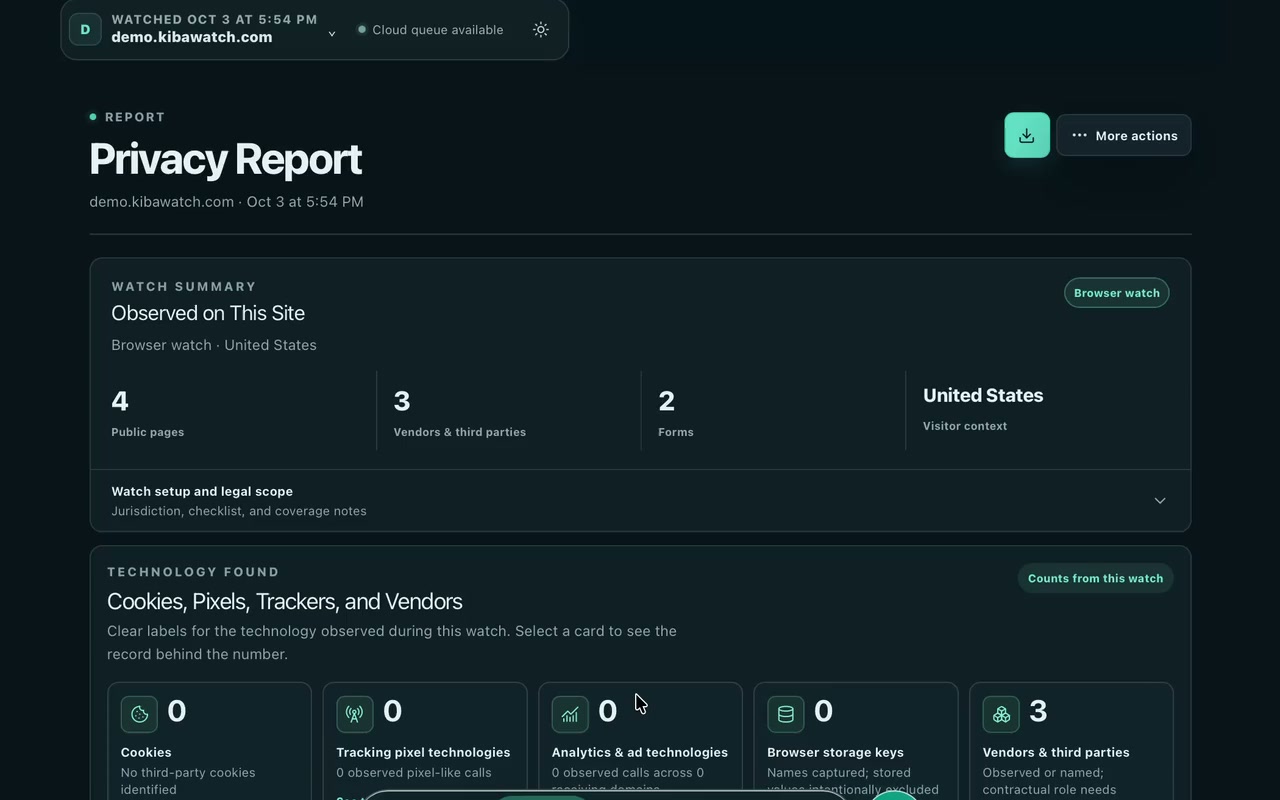
A company workspace, 3 basic website scans, and summary counts for pages, third parties, and forms. Granular evidence, detailed reports, exports, AI assistance, and advanced workflows unlock with a plan. Counts describe captured observations; they do not establish whether every check passed.
A scan credit is reserved while a trial scan is queued or running. If it ends as failed or canceled, the credit returns to your trial allowance. A completed scan counts toward your allowance even if you delete its saved results. The trial still lasts 7 days.
Both paid plans include 4 website scans and 5 third-party scans each month. Annual billing does not pool a year of scans; allowances reset monthly and do not roll over. Each website and region in a batch uses a website scan. Schedule your included scans for recurring reviews; extra third-party scan packs are one-time purchases and do not renew.
Campaigns, consent tools, tag-manager containers, and vendors change. Recurring scans help your team notice changes and keep timestamped evidence and review decisions current.
Yes. Contractors can create a profile and join company workspaces by invitation. Access follows the company workspace’s permissions and plan.
THE WATCH JOURNAL
Buying guide · 4 min read
Compare the questions a website privacy scanner, consent manager and HAR recording can answer. Choose the workflow you need, with clear limits and Watch trial details.
Read articleWorked example · 9 min read
Compare six policy claims with actual browser evidence from our synthetic Brightleaf demo. Use the free checklist to record what is supported, what needs review and what remains untested.
Read articleProduct guide · 5 min read
Start an external data and vendor inventory, compare policy with website behavior, and build a roadmap with human review.
Read articleEvidence · 7 min read
Compare requests, cookies, and the saved choice before rejection, after the click, and after reload. A worked synthetic example shows what each observation can tell you.
Read articleTeam workflows · 3 min read
Turn a third-party observation into a focused request and a traceable response.
Read articleWorked example · 4 min read
Follow an actual scan of our synthetic Brightleaf website: 4 public pages, 3 third-party entries, 2 forms, and the evidence behind a human review.
Read articleAfter your trial: $495/month or $5,500 for the first year.Annual billed upfront. Both plans replenish scan allowances monthly.